Case 01 · Desoutter · Industrial SaaS platform
An installation you navigate like a tree
At Desoutter, controllers drive dozens of tightening tools, each with its own programs. I was hired as a freelancer to design WebUI, a platform accessed from a web browser, and to create its design system. The heart of the work: a navigation that follows the structure of the installation itself.
- Role
- Product designer, freelance
- Duration
- One year, in sprints
- Team
- Two Product Owners, three front-end developers
- Deliverables
- WebUI (SaaS), design system
- Layers involved
- surfaces (not involved)
- design system (involved)
- model (involved)
WebUI is a central platform, accessed from a web browser: it brings together all the controllers of an installation and the tools they drive, where each former piece of software covered a single task. I worked on it for a year, in sprints, with two Product Owners and three front-end developers, whom I supported through implementation.
Before: one piece of software per task
Each task had its own software: configuring a controller, analysing tightening curves, collecting results, managing access rights. The same tool or the same tightening program existed in several applications, with different screens and sometimes different vocabulary.
Bringing this software together into a single product meant having four professions coexist, each looking for something different: the operator, maintenance, the process engineer and the quality engineer.
Going down into the installation
I chose the installation as the main navigation structure rather than an entry by function: configure, analyse, diagnose. The tree mirrors the relations between pieces of equipment. You enter through the controllers; each controller gives access to its tightening tools; each tool to its programs.
- Level 1 System All the Multis and their state
- Level 2 Multi Its tightening units in real time
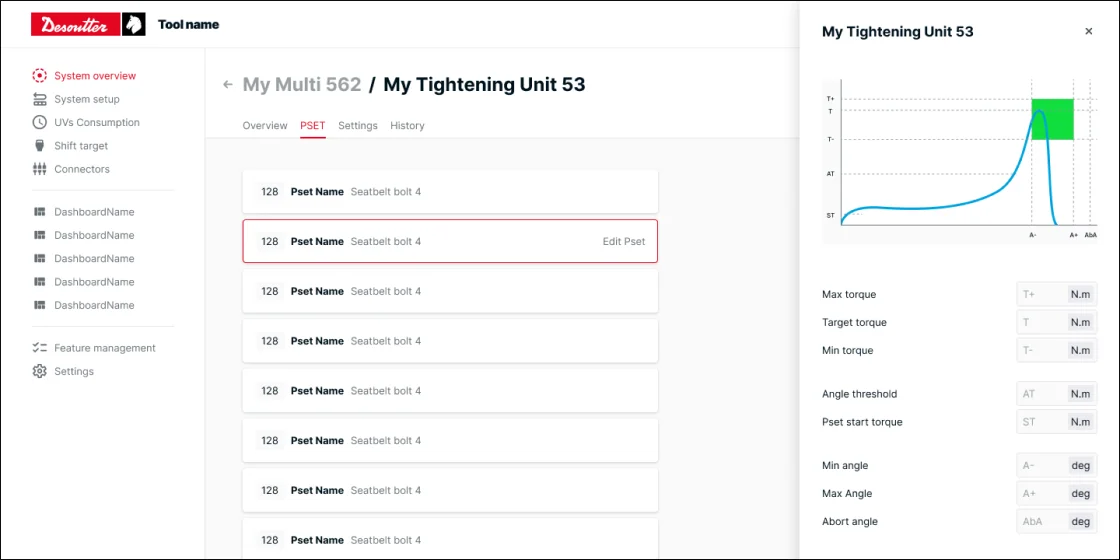
- Level 3 Tightening unit Its programs and properties
- Level 4 Program (pset) Viewed, then edited
Same page at every level: title, Overview · Settings · History tabs, breadcrumb to go back up
At every level, the page has the same shape: a title, the same tabs (overview, settings, history) and a breadcrumb to go back up. Repeating these landmarks is meant to make it easier to move from one level to the next.
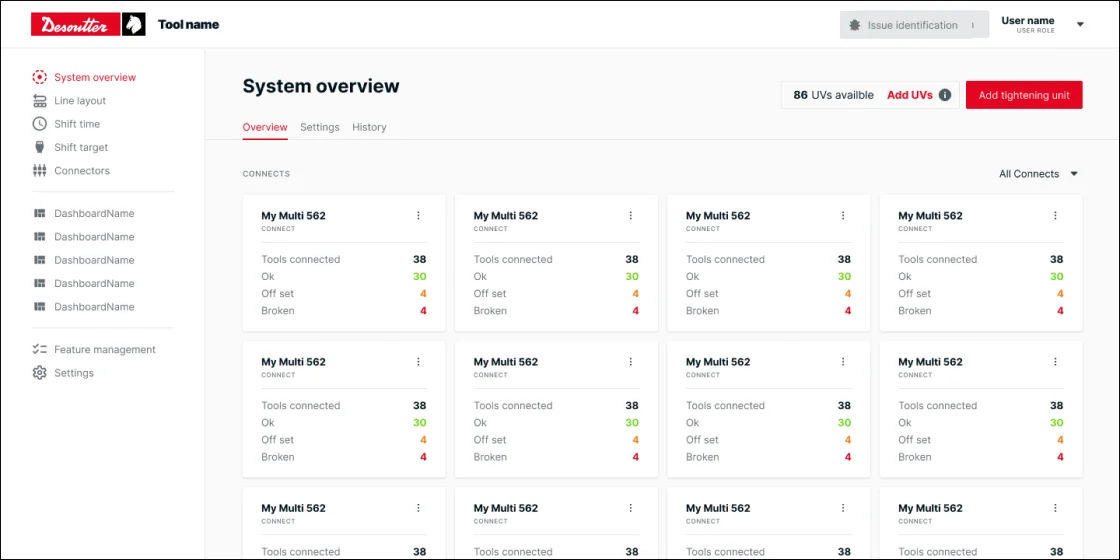
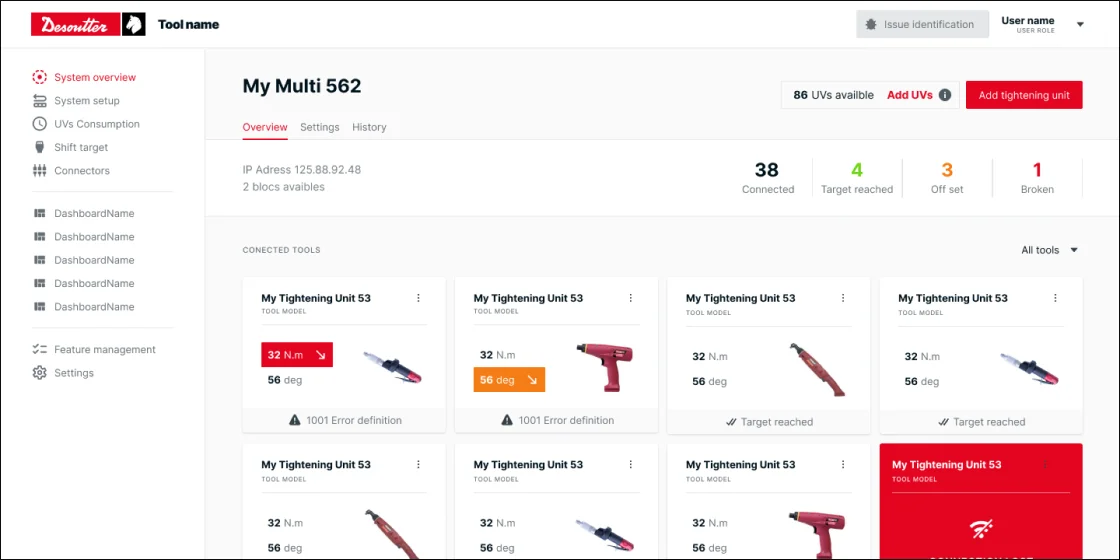
State rolls up the tree: a tool out of tolerance shows up in its controller’s counter, which shows up in the overview. From the top, you can see where to go down.
Before drawing a page, I would specify its goal, navigation, statuses, actions and content.
The same tree for four professions
Four professional profiles were identified in workshops with the Desoutter teams; three were formalised as persona sheets, the operator having no dedicated sheet. This work made it possible to state the needs and risks specific to each profile in order to design their journeys within the same installation:
- Process engineer: configure and monitor the system, apply a new configuration or roll back to the previous one. Fears a process being modified twice and production stopping.
- Maintenance: diagnose, restore a configuration, manage the fleet, recalibrate. Fears not knowing who changed what.
- Quality engineer: check the machines, analyse defects, calibrate. Fears “an OK that isn’t OK” and loss of traceability.
- Operator: configure and check the tools, monitor in real time, validate sequences.
One program, several levels of engagement
The tightening program is the node where these expectations meet. Two of the three persona sheets showed a need for both advanced settings and guided configuration. I kept both editing modes: you find the program, view it, then choose to edit it directly or step by step. Guidance offers another way into configuration, without imposing that path on everyone.
Several paths, one node
The tree provides context, but it must not force you through every level to reach a known tool. Diagnosis illustrates this interplay between navigation and search. It starts when a blocked operator calls maintenance, whose technician is not necessarily at the line. Whether they start from the overview or from a tool searched by name or serial number, they reach the same tool page, where the verification path begins.
What stays shared, what changes
The design system, which I created for WebUI, directly served this navigation. Two rules guided its variations:
- Every level of the tree follows the same template.
- States are the same everywhere and roll up from one level to the next.
The template brought together a title, tabs and a breadcrumb; the states made it possible to flag a problem at several levels of the installation. The team could reuse these landmarks, then design the content and actions specific to each page.
What was handed over to the team
WebUI aimed to bring together configuration, curve analysis, result collection and rights management. By the end of my assignment, the tree, the page template and the design system were in place, and the front-end team was building new pages from them, without going back through screen-by-screen design.
This result concerns the structure of the product and its reuse by the team. It is not enough to establish time saved in diagnosis or a reduced learning curve, which are not documented here.
The structuring choice remains a navigation based on the installation, complemented by search to reach a piece of equipment directly.